
Shipping from multiple EU warehouses? The VAT exemption widget might be confusing your domestic customers. Here’s how to fix that with one simple setting.
If you fulfil orders from multiple warehouse locations, you already know that domestic customers in your warehouse countries shouldn’t see the VAT exemption widget. A UK customer shopping from your UK warehouse doesn’t need a VAT exemption form. A German customer shopping from your German fulfilment centre is a domestic buyer. Showing them a B2B VAT exemption widget creates confusion. A new feature lets you hide the VAT exemption widget for all countries where you operate warehouses, with a single configuration. Here’s how it works and why it matters for multi-location operations.
TL;DR: Shipping from multiple EU warehouses? The VAT exemption widget confuses domestic customers who can’t actually get tax-free pricing. New setting: enter all your fulfillment countries (e.g., NL, DE, FR) and the widget automatically hides for those shipping addresses. Find it in Checkout Editor → Tax Exempt widget → Settings. Available now for Shopify Plus →
You run fulfillment centers in the Netherlands, Germany, and France. A German customer places an order. They see the VAT exemption widget and think: “Great, I can get business pricing!”
But wait. Your German warehouse will ship to them. That’s a domestic sale. VAT exemption doesn’t apply.
Now you have a confused customer and a support ticket.
Sound familiar? Let’s fix this.
Our app already has a setting to hide the VAT widget when the customer’s shipping country matches your store’s primary country. That works great if you only ship from one location.
But many B2B merchants have grown beyond a single warehouse:
When a French customer orders and you fulfill from your French warehouse, that’s not a cross-border sale. VAT exemption doesn’t apply. But the original “Hide for same country” setting only checks your store’s registered country (let’s say Netherlands).
Result: French customers see the VAT widget, enter their VAT number, and expect tax-free pricing. Then they get charged VAT anyway because it’s a domestic French shipment.
This creates:
Let’s recap when VAT exemption actually applies:
Intra-Community (Cross-Border B2B):
Domestic (Same Country):
The widget is specifically for intra-community supplies. When both seller and buyer are in the same country – whether that’s your primary store location or a secondary fulfillment center – the widget shouldn’t appear.
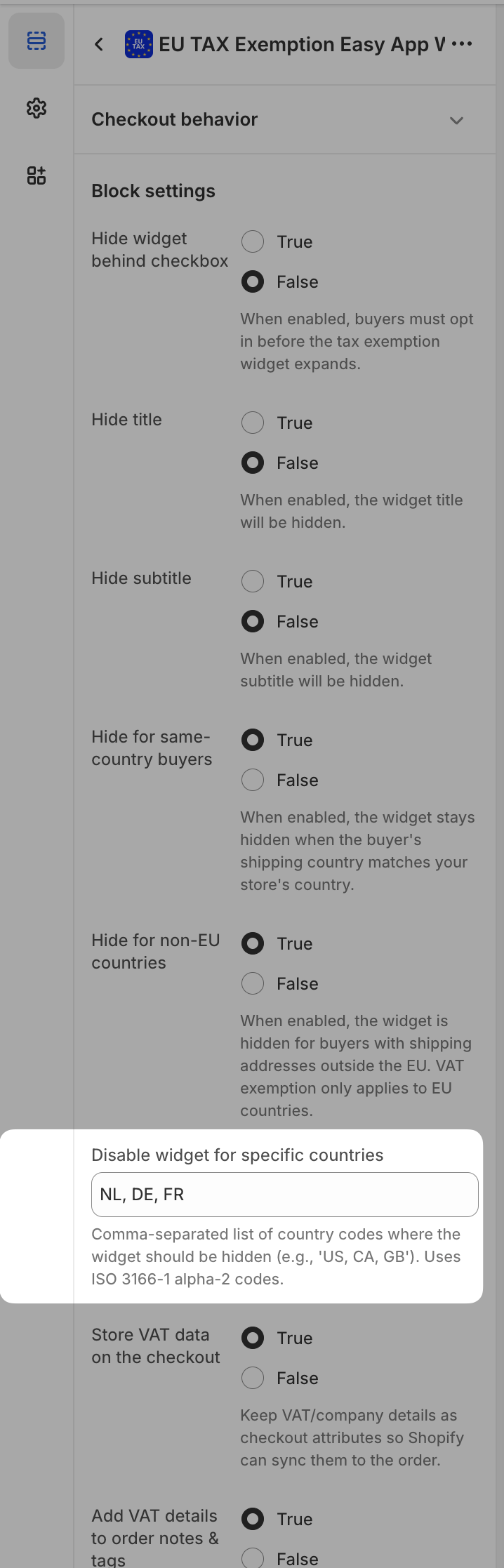
We’ve added a new setting: “Disable widget for specific countries”
Enter all countries where you have fulfillment operations:
NL, DE, FR
The widget now automatically hides when the customer’s shipping address matches any of these countries.
How it works:
No confusion. No false expectations. No support tickets.
Multi-Warehouse Merchants: You have your own fulfillment centers in multiple EU countries. Orders route to the nearest warehouse.
3PL Users: You work with third-party logistics providers who have warehouses across Europe. Amazon FBA sellers, this means you.
Dropshippers with EU Suppliers: Your suppliers ship directly from their locations in various EU countries.
Anyone Expanding Fulfillment: You’re planning to open a second warehouse and want to get ahead of this problem.
If you ship from only one country, you don’t need this. The standard “Hide for same country” setting handles your use case perfectly.
Step 1: Go to your Shopify Admin → Settings → Checkout
Step 2: Click “Customize” to open the Checkout Editor
Step 3: Select the Tax Exempt widget from the sidebar
Step 4: Find “Disable widget for specific countries” in settings
Step 5: Enter country codes separated by commas: NL, DE, FR
Step 6: Save
That’s it. The change is live immediately.
Country codes to use: Use standard ISO 3166-1 alpha-2 codes:
You get the idea. Add every country where you have fulfillment operations.
You might wonder: “If I hide the widget for Germany, how do German B2B customers get their tax exemption?”
They don’t – and that’s correct.
When you ship from Germany to Germany, VAT exemption doesn’t apply. The German business customer pays German VAT at checkout. They then reclaim this VAT through their regular quarterly VAT return.
This is how it works for domestic B2B transactions throughout the EU. The buyer pays VAT upfront and recovers it later. Not ideal for cash flow, but that’s EU tax law.
Where VAT exemption DOES apply:
The widget still works perfectly for true cross-border sales.
This new setting works alongside our existing visibility options:
“Hide for same country” Still useful. Hides widget when shipping country matches your primary store country.
“Hide for non-EU countries” Hides the widget for customers outside the European Union. US, UK, Swiss customers don’t see it.
“Disable for specific countries” The new setting. Hides widget for any country you specify.
You can combine these:
Now the widget only appears for EU customers shipping to countries where you don’t have fulfillment – exactly where reverse charge applies.
Your Setup:
Before this feature:
| Customer Location | Fulfills From | Widget Shows? | Problem |
|---|---|---|---|
| Germany | DE | Yes | Customer expects exemption, gets charged VAT |
| France | FR | Yes | Same issue |
| Netherlands | NL | No | Works correctly (same country hidden) |
| Belgium | NL | Yes | Works correctly (cross-border) |
| Spain | FR | Yes | Works correctly (cross-border) |
After enabling “Disable for NL, DE, FR”:
| Customer Location | Fulfills From | Widget Shows? | Result |
|---|---|---|---|
| Germany | DE | No | Clean domestic checkout |
| France | FR | No | Clean domestic checkout |
| Netherlands | NL | No | Clean domestic checkout |
| Belgium | NL | Yes | Proper cross-border exemption |
| Spain | FR | Yes | Proper cross-border exemption |
No more confused customers. No more support tickets about “VAT exemption not working.”
This feature hides the widget based on the customer’s shipping address. It doesn’t know which warehouse will actually fulfill the order.
Most merchants route orders to the nearest warehouse, so shipping country = fulfillment country in most cases. But if your routing is more complex, keep that in mind.
Example edge case:
For most setups, this isn’t an issue. Your fulfillment country list matches your routing logic. But if you have unusual routing rules, you might want to only disable countries where you always fulfill domestically.
This feature works within Shopify’s Checkout Extensibility, which means it’s available for Shopify Plus merchants.
Already using EU Tax Exemption Easy? The setting is available in your widget configuration right now. Open the Checkout Editor and add your fulfillment countries.
Not using the app yet? Install EU Tax Exemption Easy to get automatic VAT validation, proper exemptions for cross-border B2B sales, and smart widget visibility controls.