
The vat-id order attribute stores validated VAT numbers (format: DE123456789) in Shopify Additional Details. Map it in EasyBill, Billbee or any invoicing software that reads note_attributes.
B2B orders in Shopify need VAT numbers on invoices. Without automatic capture, that means chasing customers for their VAT number after the order, manually adding it to your invoicing software, and hoping nothing slips through. A recent update to the Translate Product Images app changes this: VAT numbers entered by your B2B customers during checkout are now automatically saved as order attributes in Shopify. Invoicing software like EasyBill, Billbee, and others can read these attributes directly, so your B2B invoices are complete from the moment the order arrives.
TL;DR: Your B2B customers’ VAT numbers are automatically saved as order attributes in Shopify.
This enables automatic integration with invoicing software like EasyBill, Billbee, or Xero.
When using the EU Tax Exemption app for B2B customers, validated VAT numbers are automatically saved with every order. The automatic VAT validation through VIES ensures only valid EU VAT numbers are accepted, making it simple to integrate with your existing invoicing software.
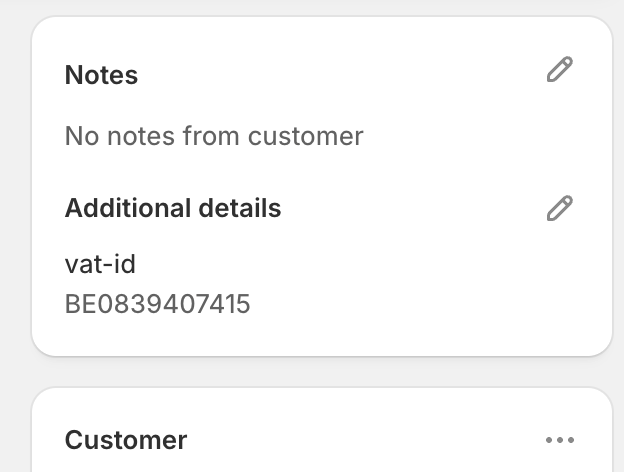
After a B2B order, you’ll find the VAT number in two places:
The VAT number is stored in the format vat-id: XX123456789, where XX is the country code (DE for Germany, NL for Netherlands, CZ for Czech Republic, etc.). This is the same format used by the VAT validation at checkout.
Most invoicing apps for Shopify can read order attributes. Here are the most commonly used:
| Software | Connection via |
|---|---|
| EasyBill | Order Additional Details (note_attributes) |
| Billbee | Order Additional Details (note_attributes) |
| Xero | Order Notes or Custom Fields |
| QuickBooks | Via Shopify connector |
| Moneybird | Order metadata |
For EasyBill users, the setup works as follows:
vat-id field to the VAT number field in EasyBill.Most connectors allow you to specify which note_attribute field to use for the VAT number. Use vat-id as the field name.
What format is the VAT number in?
The format is always: country code + VAT number, without spaces. For example: “DE123456789”, “NL123456789B01”, “CZ14201062”. This is the standard EU format used by VIES.
What if I don’t see a VAT number on an order?
The VAT number is only saved for orders where the customer actually entered and validated a VAT number. Regular B2C orders won’t have a VAT number. Learn more about adding a VAT number field to your Shopify store.
Can I use this with other invoicing software?
Yes, any software that can read Shopify order attributes (note_attributes) can retrieve the VAT number. Contact your invoicing software provider if you need help with configuration.
Does this work with the Checkout UI extension?
Yes, the VAT number is saved regardless of which checkout method the customer uses: the B2B checkout button, the Checkout UI extension, or manual draft orders.
What about reverse charge invoices?
For intra-community supplies (reverse charge), your invoice must show 0% VAT with the customer’s VAT number mentioned. By having the VAT number automatically available, your invoicing software can process this automatically. Check our complete EU VAT guide for Shopify for more details.
How does this compare to other VAT apps?
See our Shopify VAT app comparison for a detailed overview of features across different apps.
The VAT number is automatically saved as soon as you have the EU Tax Exemption app installed and a customer completes a valid VIES validation. No additional configuration is needed in the app itself.
Check your invoicing software documentation on how to map order attributes to the correct fields, and you’re ready to automatically generate correct B2B invoices.
View the EU Tax Exemption app in the Shopify App Store
Questions about connecting with your invoicing software? Contact us.